
In this review, I’ll break down what Plottr is, what it can do, who it’s best for, and why its lack of AI is actually one of its biggest strengths.
Plottr Review: Quick Verdict and Introduction
Put simply, Plottr is the best planning tool available for fiction writers, particularly for novelists working with timelines, multiple POVs, or complex story structures. It is less suited to drafting full manuscripts than something like Scrivener, but Plottr excels as a visual plotting tool and as a means to keep your novel organised and coherent.
| Category | Score |
| Ease of Use | 9/10 |
| Plotting & Timelines | 10/10 |
| Character Planning | 8/10 |
| Manuscript Writing | 7/10 |
| Value for Money | 9/10 |
| Best For | Novel planning & outlining |
| NW Offer: | 15% off standard pricing** |
**Use offer code NEWWRITERS15 at checkout; offer applies to Plottr Annual, Lifetime; Plottr Pro Annual, Lifetime; Plottr Pro + Community Annual, Lifetime
Note: if you click through to the Plottr site and purchase the software, they will give New Writers UK a small commission. However, this review is based purely on my own experience of the software and all opinions expressed are my own.
Any links to companies with whom we have an affiliate relationship will be marked with an *.
2. What Is Plottr?
If you’ve ever stared at a blank page wondering how to organise your story ideas, you’re not alone. Plotting a novel can quickly become overwhelming, especially when juggling multiple characters, timelines, and subplots. Even more difficult is the task of organising a novel you’ve drafted without plotting – something many writers find a lot more fun, but it can cause all manner of issues during the editing stages.
That’s where Plottr comes in. This visual story planning tool is designed specifically for writers who want clarity before, during or even after drafting their story or novel.
Plottr is writing software that enables writers to visually outline and plan their novel or story. It helps writers map out their books using timelines, scene cards, and story templates, and allows them to keep track of characters, props, and locations, as well as how various elements interlink.
Think of it like a digital corkboard or set of index cards, but far more powerful and organised.
The software is designed for:
- Novelists or short story writers
- Screenwriters
- Series writers
- Anyone managing complex story structures
Unlike drafting tools, Plottr focuses on planning, structuring, and organising your story before you write it. So you would use this standalone software alongside the app you use to actually write your novel or story. Note that Plottr offers integration with both Microsoft Word and Scrivener*.
Also, at a time when many writing tools are rushing to integrate AI, Plottr takes a refreshingly different approach, instead choosing to support rather than spoon-feed writers.
3. Key Features (What It Can Do)
Visual Timeline
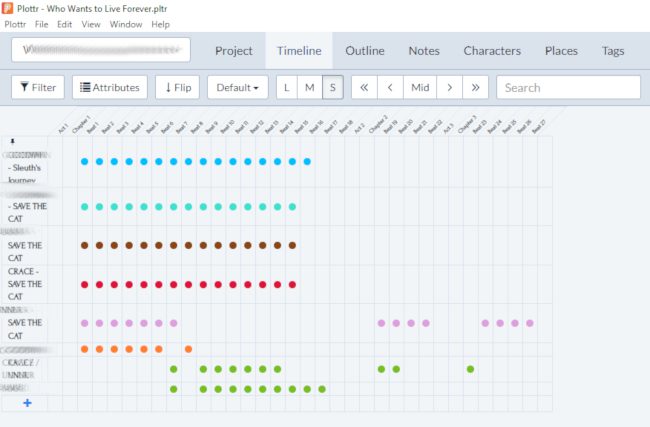
Plottr’s core feature is its drag-and-drop timeline, where you can map scenes, chapters, and plotlines visually. Imagine a digital version of a giant whiteboard with loads of Post-it notes or a corkboard with multiple reminder cards pinned to it… but far easier to use and change.
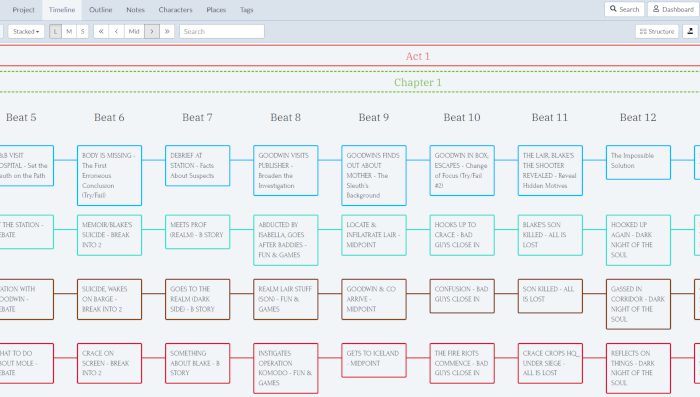
You can:
- Track multiple plotlines and subplots side-by-side without getting overwhelmed, giving characters their own plotlines (and hence arcs).
- Rearrange scenes easily without misplacing or losing vital information.
- See your entire story structure at a glance by zooming out, or zoom in to view the details of particular beats or chapters within each plotline.
- Customise your structure to set it out in chapters, episodes or scenes as you see fit.
- Scene Cards allow you to track individual characters, locations, and even specific props or details, so you can remember that lipstick-smeared champagne glass in the opening scene or any other pertinent piece of information.
Templates for Faster Plotting
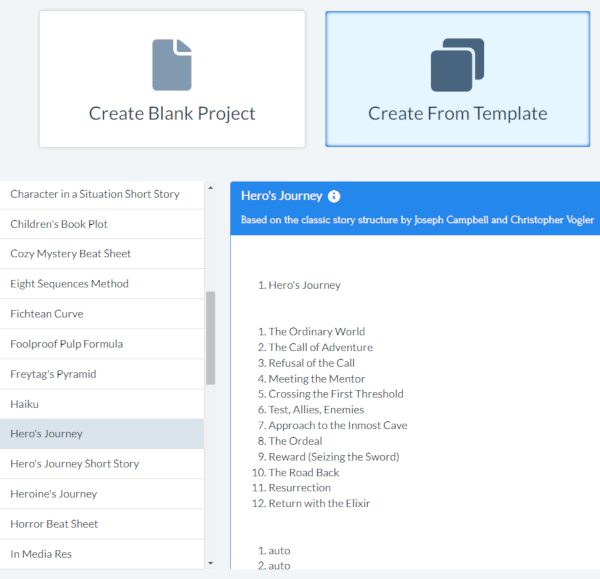
If you need a hand deciding on an appropriate structure for your novel, Plottr’s 30+ story templates are invaluable. They include:
- The Hero’s Journey – Based on the classic writings of scholar Joseph Campbell and the backbone of some of the greatest novels or movies of the last century, including Star Wars, The Lord of the Rings, Harry Potter, Hunger Games, and Dune.
- The Sleuth’s Journey – An adaptation of the Hero’s Journey to help mystery novels shine, with beats including The First Erroneous Conclusion (Try/Fail), Reveal Hidden Motives, and Villain’s Ordinary World to help authors add greater depth and realism.
- Children’s Book Plot – An easy-to-follow formula to develop stories for young readers that ensures authors don’t over-complicate things and maintain narrative momentum.
- Romancing the Beat – A popular romance plot structure based on the book by Gwen Hayes that can help authors get their readers’ pulses racing.
- Freytag’s Pyramid – The classic dramatic structure developed by playwright Gustav Freytag in the 19th century can still be used to great effect today. Following the five steps of exposition, rising action, climax, falling action, and catastrophe/resolution, the likes of Romeo and Juliet and George Orwell’s 1984 fit well into this structure.
- Three Act Structure – Sometimes it’s best to keep things simple. This classic story structure for plotting novels and screenplays certainly does that, but it can provide an excellent backbone for your novel.
These help you start quickly—even if you’re unsure how to structure your story.
Integrations
You can export your outline to tools like Microsoft Word or Scrivener*, so Plottr fits neatly into your existing writing workflow. If you prefer, you can also import projects from Scrivener or Snowflake Pro to Plottr.
Optional Cloud & Collaboration (Pro)
The Pro version adds Cloud auto-sync and storage and real-time collaboration, which is perfect if you are co-writing a novel, screenplay or series.
4. A Big Positive for Plottr: No AI (And Why That Matters)
One of Plottr’s standout features is what it doesn’t do: it does not use AI.
For many writers, that’s a major advantage:
- Your ideas stay fully your own, and you won’t get disqualified from competitions or publication.
- There is no algorithm-generated content to interfere with your voice or destroy your individual writing style.
- No reliance on AI suggestions or prompts, so there are no “grey areas” about whether you’ve used AI to write your story.
- A more intentional, craft-focused writing process that relies on your imagination, perseverance and intelligence.
Plottr is built to support your creativity – not replace it.
5. Who Plottr Is Best For
Plottr is especially useful for:
- Plotters (obviously) – If you like planning your story before setting to work, Plottr is clearly the ideal tool, as it helps you get all your ducks in a row.
- “Messy” or visual thinkers – Writers who think non-linearly will certainly benefit from the visual layout found at Plottr and will appreciate the various views and filters.
- Series writers – The Story Bible and series planning tools found in Plottr are a big advantage for those writing a series of novels. It allows you to add an unlimited number of books to a series, and you can create plotlines for individual novels or the series as a whole.
- Pantsers (surprisingly!) – Even if you don’t outline beforehand, Plottr can help you fix plot holes, track continuity (and mend any issues), and organise your revisions effectively.
6. Pricing & Plans
Plottr offers several pricing options (given in US dollars) depending on your needs. Remember, you can get a 15% discount if you add the offer code NEWWRITERS15 to the “Add discount code” section at checkout.
Standard Plottr – $60/year or $150 lifetime
Includes the following features:
- Visual Timeline
- 40+ Templates
- Word & Scrivener Integration
- Editing Companion
- Character Sheets
- World Building
- Series Bible
- Family Tree
- Visual 3-Act Structure
- Idea Folder / Goal Tracker
- Character Journeys
- Windows & Mac
- Work Offline
Plottr Pro – $9.99/month, $99/year or $599 lifetime
The Pro version includes all the standard features mentioned above plus the following:
- Browser (Works on Tablets!)
- Cloud Sync
- Real-time Collaboration
- Cloud Backups
- Sync with the Idea Threads app
Plottr Pro + Community – $14.99/month, $129/year or $649 lifetime
- Includes access to community and training resources
There’s also typically a free trial (around 30 days) to test it out before committing.
7. Plottr Pros & Cons
Pros
- Intuitive visual interface
- Lifetime purchase offers excellent value
- Excellent for complex plots and multiple storylines
- Strong worldbuilding tools
- Works offline (standard version)
- No AI interference
Cons
- Not a drafting tool (you’ll still need Word/Scrivener)
- Subscription pricing may not suit everyone
- Learning curve if you’re new to plotting
8. Final Verdict
Plottr is one of the best tools available for visual story planning and organisation.
If you want:
- A clearer structure
- Better control over your story
- A distraction-free, non-AI creative process
…it’s absolutely worth getting involved.
If you’re serious about finishing your novel, or you just want a clearer way to organise your ideas, Plottr is well worth trying. The lifetime licence is especially good value for writers planning multiple books or long-term projects.