
The Novel Factory is a fantastic one-stop shop software package for writers who want to stay on track to finish and publish their novel.
Proudly free of AI, the software incorporates everything an aspiring novelist could wish for. The step-by-step guide to writing and publishing your book steers you through the planning, structuring, writing and editing stages, and helps you build and maintain the momentum needed to write and refine your first (or next) novel.
The Novel Factory* incorporates many brilliant tools that enable you to develop deep, interesting and believable characters, locations and items that feature in your stories. The varied and useful features also help you create worlds, and hence stories, that grab and hold the reader’s attention.
Add to that the exceptionally intuitive, easy-to-use plot manager, subplot manager and timeline features, and The Novel Factory helps you keep the organisational aspects of your work in check. Meanwhile, the video tutorials in each section give you a quick overview of how to make the best use of each feature.
Whether you are in the planning stages of your debut novel, or you are struggling with a jumbled web of notes and files from your work in progress, The Novel Factory can definitely help you finish your book. I fit into that second category (see below). Not only that, the software is used by many published novelists, including The Novel Factory founder, Katja Kaine, whose debut novel Blood of Gods and Girls was published by Penguin in July 2026.
*Note: if you click through to The Novel Factory site and purchase the software, they will give New Writers UK a small commission. However, this review is based purely on my own experience of the software and the opinions expressed are my own.
Quick Verdict
The Novel Factory – Our Rating: 9.5/10
The Novel Factory is best for:
- Writers who are serious about finishing and publishing their novel.
- Anyone who doesn’t want to use AI for creative writing.
- Those seeking assistance to organise their plots, subplots and timelines.
- Authors seeking to create rich fictional worlds and characters with depth and extensive, interesting backstories.
| Category | Score |
| Ease of Use | 10/10 |
| Useful Features | 10/10 |
| Plotting & Timelines | 9/10 |
| Character Planning & Development | 10/10 |
| Manuscript Writing | 9/10 |
| Value for Money | 9/10 |
| New Writers Offer: | 20% off standard pricing** |
**Subscribers to our free New Writers Newsletter can use The Novel Factory discount code NEWWRITERS26 at checkout to receive 20% off Annual Subscriptions (Basic or Standard) or a Lifetime licence to The Novel Factory (version 3) – Claim Offer Here

Pros of The Novel Factory
- Completely free of AI – so your imagination takes centre stage as you craft your novel and you can be 100% confident it is all your own work
- Strong Commitment to Social Responsibility – which chimes with our ethics at NewWriters.org.uk
- Excellent guided novel-writing process – takes the mystery out of planning, writing and publishing your novel
- Strong character development tools – keep your characters organised and allow you to create believable and extensive backstories
- Plot, subplot and timeline manager tools – keep everything organised, even if you are not a natural plotter; you can use plot templates or create your own plot structures
- The ability to link scenes, timelines, characters and more – helps keep everything organised and internally consistent
- Exporting, version history, and back-up features – ensure you are in control of your novel
- Excellent value for money – especially the lifetime licence
- Completely free 30-day trial – with no need to give credit card details
Cons
- The Basic subscription lets you work on only one novel – although you can upgrade at any time if you want to start another book
- Statistics section could be expanded – for instance, to include more linguistic analysis data such as the average sentence length
What Is The Novel Factory?
Created by award-winning writer and published novelist, Katja Kaine, The Novel Factory began as a relatively basic desktop app to help Katja organise her writing notes. Since its earlier incarnations, however, Katja and the dedicated team at The Novel Factory have made regular improvements to the software, adding features and improving usability, and now it contains all the features and tools any aspiring novelist could need.
One of the greatest aspects of The Novel Factory is how intuitive it is to interact with. Unlike some writing software which can be cumbersome and difficult to navigate or understand, The Novel Factory interface is clear and simple. That is not to say it isn’t bursting with useful features, from the plot, subplot and timeline manager tools to the ability to create extensive and varied backstories for your characters.
To help you as you become familiar with the software, there are some very useful tutorial videos, presented by Katja or others from her team, that point out the best ways to use each section.
Alongside the brilliant software itself, we are also very impressed with the general ethos of the company. They offer hardship licences to people with low incomes or disabilities, and they make annual donations to Room to Read, a non-profit organisation supporting children’s literacy and girls’ education across Asia and Africa.
How I Use The Novel Factory
At the time of writing, I’ve been working on my debut novel for several years, and the editing process has taken far longer than the initial draft.
Since I first started writing the novel, I’ve accumulated extensive notes from the characters’ weird and wonderful backstories to the specific (real and imagined) locations in which the action takes place. I can also record the tiniest details about various items featured in the story, such as the specific pen one character uses or the number of bulbs in a surgical lamp in a particular scene.
My notes were scattered around literally hundreds of Word docs and spreadsheets, and I had jotted scores of handwritten ideas or musings in physical notebooks. That didn’t exactly lend itself to a methodical, consistent editing process.
Thankfully, The Novel Factory has helped me organise all these notes and present them in an easily accessible way so I can find them without any bother when required. The software also allows you to link characters, scenes, locations and items, which is proving an excellent time-saving feature.
I essentially plotted my narrative as I went along (as a natural “pantser” as opposed to a “plotter”), but – I realised too late – this resulted in a few timeline or plot inconsistencies that I found difficult to iron out. Through the plot, subplot and timeline manager tool within The Novel Factory software, I have developed a much more organised approach to editing as it has allowed me to visualise the key plot points and ensure they all follow logically.
At the time of writing, I’ve made more progress towards finishing my novel in the last few weeks than I had in the previous nine months.
The Novel Factory – Key Features
Here we present a little more information about some of the key features contained within The Novel Factory. Note that new features or enhancements to existing features are added regularly, so take a look at The Novel Factory features page for the latest information.
Guided Novel Roadmap
This is like a mini novel-writing course that guides you through 15 stages of your novel, from the initial premise, through developing the plot, writing synopses, creating characters, researching, editing, and getting published.
It might well be that you have experience of at least some of these steps, but you can dip in and out and there’s bound to be something useful. It is also extremely useful for first-time novelists as it helps to avoid some of the common pitfalls that can cause a writing project to stutter or fail completely.
Character Builder
It’s almost impossible to write a great book without creating great characters. And The Novel Factory gives you plenty of assistance when creating believable, deep characters that will bring your story to life.
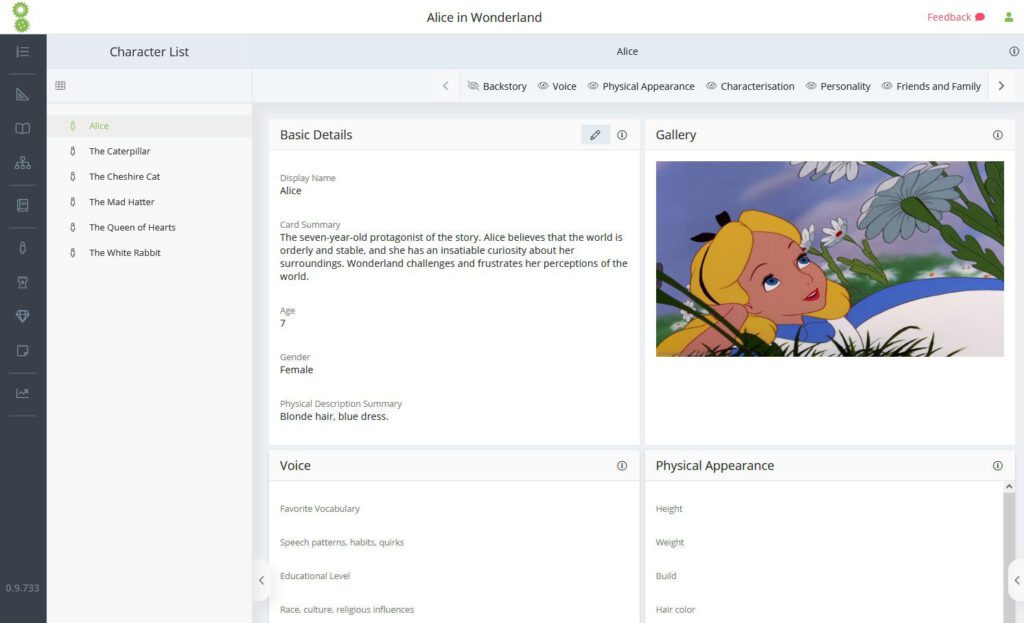
You can record your characters’ various positive and negative personality traits, fears and phobias, philosophies or mottos, and quirks or mannerisms… and that’s just the beginning. There are sections that cover their narrative backstory, their voice, details of friends and family, physical features, relationships, conflicts, education and hobbies, and all sorts of other details.
You don’t have to complete all sections, of course, and certainly not for the peripheral characters. But for your protagonist and other main characters, the more sections you complete, the better-rounded and more believable your characters will become.
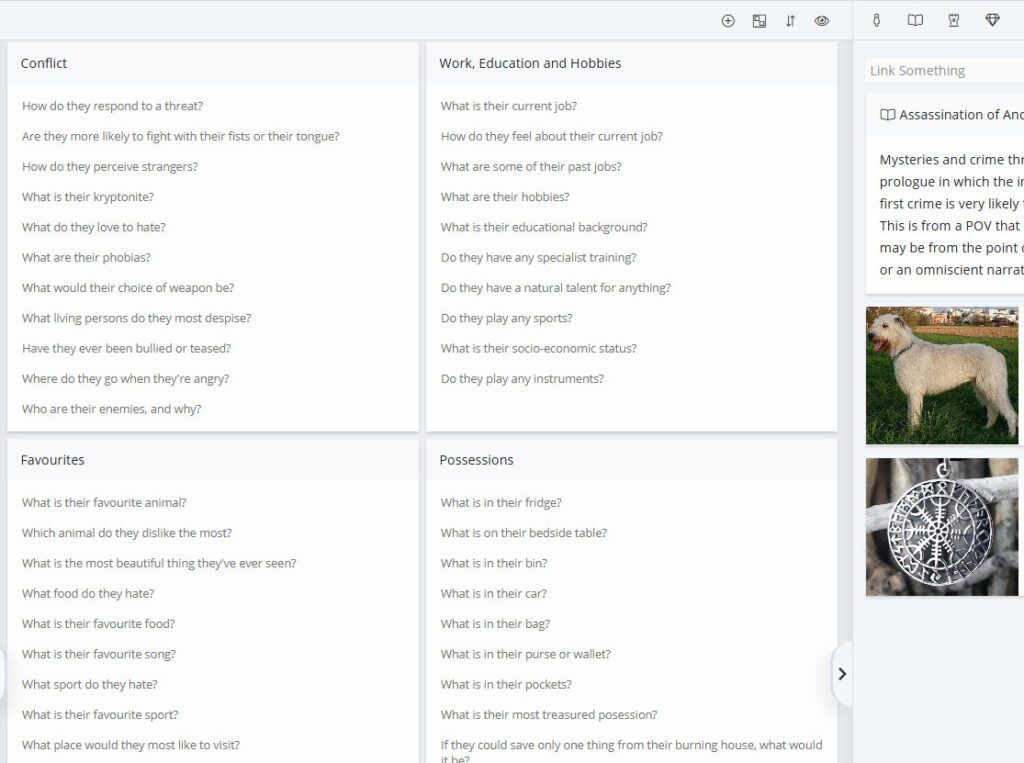
Crucially, because you record all the information in each character’s section, you know exactly where to find certain details if you ever need to (for instance, double-checking whether your character likes wine or beer or something more extravagant while writing a scene in a bar).
Plot Manager and Subplot Manager
As with the Characters section, the Plot Manager and Subplot Manager features allow you to delve as deeply as your novel requires. There are several plot templates to get you started, including Detective Noir, Hero’s Journey, Romance, and Screenplay. Alternatively, you can choose to create your own plot structure that fits your requirements.

The main Plot Manager gives you the chance to gain a full overview of your writing project, and you can add scenes, chapters or plots as you see fit. The drag-and-drop interface makes it easy to edit the order of scenes and chapters.
The Subplot Manager, meanwhile, allows you to organise additional plots by character viewpoint (which can be colour-coded), which gives an alternative mechanism for keeping everything in order.
Timeline Tools
The Timelines feature links directly to the Plot Manager, allowing you to connect specific scenes to timelines. The Timelines feature is especially useful for novels with two or more timelines, or when using flashbacks or completely different plotlines. You can order events within timelines and ensure everything works without any continuity errors.
The Manuscript Writing Editor
The Manuscript section of the software is where the magic (hopefully) happens. This is where you actually write your novel. Alternatively, you can import your novel text from Word. If doing so, it’s worth taking the extra time to add scene dividers and chapter dividers, as this will make things much easier once it’s been imported.
If you import your manuscript from Word, The Novel Factory will also scan the text and automatically link characters (when their name appears).
Of course, if you simply write within The Novel Factory interface, you can link characters, scenes and other things as you go along.
To ensure you don’t lose any work (for instance if there’s a tech meltdown or something equally disastrous), this section auto-saves every few seconds, although you can also save manually. You can also change the view so you can read your manuscript in one long document, or split into chapters or scenes. There’s a useful statistics section too, detailing how many words you’ve added that day, in which you can set targets to help keep you motivated.
World Building
The world building aspects of The Novel Factory are generally built within some of the other features, notably the Locations section. As with the Characters section, when setting up a location, there are numerous questions to answer that can prompt you to develop complex and interesting places and settings.
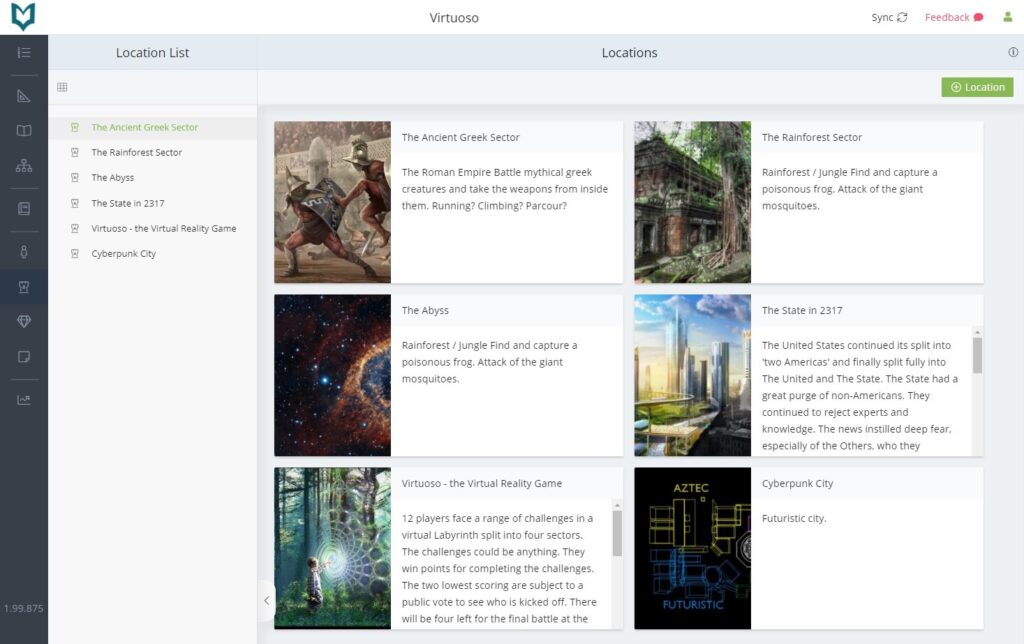
Of course, if you are simply picking a train station platform as a location, you probably don’t need to answer many of the questions relating to Governance and Economics. But if you are creating a completely new world, or a city within a world, answering at least some of the following questions could prove very useful in bringing it to life:
Is it a matriarchy or a patriarchy? How long has the system of government been in place? What calendar is used? Is there any centralised healthcare? Does the government provide social assistance? Is there public transport? Do people trust the government? What is the system of taxation? Does the government spy on its enemies or its people?

That just scratches the surface of the questions available, and hence the amount of information you can potentially develop and store about your novel’s locations. This can prove especially useful when writing a series of novels set in the same (or similar) locations, as you can duplicate sections and add to a new novel (with the Standard and Lifetime licences).
Pricing
Despite the company being based in Yorkshire, UK, the pricing is quoted in US dollars. Note that prices are correct at the time of writing; please check The Novel Factory Pricing page in case they have changed.
You can subscribe to the Basic (one novel) software for $8.25 / month, or the Standard (unlimited novels) for $22 / month. It makes financial sense, however, to go for an annual subscription or, if you really love it as we do, the Lifetime licence.
Note that a 30-day free trial is available for all new users, with no credit card required. The trial period includes one novel project with all other Standard level features. As mentioned, prices are given in USD, but if you use a different currency, the price will be given at checkout based on current exchange rates.
The Novel Factory Pricing
| Basic | Standard | Lifetime |
| $82.50 / year | $220 / year | $649 One-off payment for lifetime access to Version 3.0 |
| Two months free compared to monthly plan | Two months free compared to monthly plan | |
| One Novel | Unlimited Novels | Unlimited Novels |
| Core features including: | Core features PLUS: | All features included |
| • Plot Manager | • Dark Mode | |
| • Characters, Items and Locations | • Import characters and locations between novels | |
| • Manuscript Section | • Additional formatting features | |
| • Writing Statistics | ||
| Perfect if you’re just starting out | Great for writers with multiple novels | For serious writers who are ready to commit to their novel-writing dreams |
Which Writing Software is Better: The Novel Factory or Plottr?
Ultimately, the writing software you prefer will come down to personal preference. When all’s said and done, whichever novel software helps you finish (and hopefully publish) your novel is likely to be the one you love.
Having said that, although we are very fond of Plottr, it offers a slightly different option to The Novel Factory. In essence, Plottr is a fantastic tool for planning and organising the plot and structure of your novel, and for creating and keeping track of your characters and locations.
The Novel Factory, meanwhile, offers more of a one-stop shop, covering everything from the initial ideas for your story through the writing and editing. The step-by-step novel writing guide, or Roadmap, also walks you through the various later stages of novel writing, including getting effective feedback and then actually publishing your book.
For those who simply want to write in Word or similar and only want assistance with the plotting side of things, Plottr is a brilliant option. For writers who are seeking a little more, along with the ability to write and edit their work within the software interface, The Novel Factory is certainly the better option.
The Novel Factory vs Plottr
| Feature | The Novel Factory | Plottr |
| Novel Writing | Yes | No |
| Plotting | Excellent | Excellent |
| Editing | Excellent | Good |
| Plotting | Excellent | Excellent |
| Characters | Excellent | Good |
| Timeline | Excellent | Excellent |
| Worldbuilding | Excellent | Basic |
| Value | Excellent | Excellent |
| Best for | Planning, writing and editing novels | Planning novels and series |
| Discount Code | 20% – use code: NEWWRITERS26* | 15% – use code: NEWWRITERS15** |
*The Novel Factory: Use discount code NEWWRITERS26 at checkout to receive 20% off Annual Subscriptions (Basic or Standard) or Lifetime licence to The Novel Factory (version 3) – Claim Offer Here
**PLOTTR: Use offer code NEWWRITERS15 at checkout; offer applies to Plottr Annual, Lifetime; Plottr Pro Annual, Lifetime; Plottr Pro + Community Annual, Lifetime – Claim Offer Here
Check out our Plottr Review for more information about that writing software application.
Final Verdict – We Love The Novel Factory… You Will Too
As you will have seen above, The Novel Factory is packed with brilliant features to make your novel-writing journey as painless as possible. It will still require a LOT of effort and time, but this software allows writers to keep things as organised and on-track as possible.
The fact that the software makes a point of not using AI and also supports some brilliant causes is, for us, the cherry on top of this very tasty cake.
The Novel Factory is the strongest dedicated novel-writing tool we’ve tested. It combines planning, drafting and organisation in a way that few competitors manage, making it especially valuable for writers tackling their first book or anyone wanting a more structured creative process. It is also brilliant for those writing (or planning to write) a series of related books or stories.
If we still haven’t convinced you, remember you can claim a 30-day free trial. And if you like what you discover at The Novel Factory, please make use of our 20% discount code: NEWWRITERS26.